v0.6.0 is the biggest release since the CRM rebuild — four headline features land together. AI rewrite shows up everywhere you type. Notifications get a real grid you can tune. SLA clocks run on every ticket. Login resists credential stuffing.
BYO-AI text rewrite
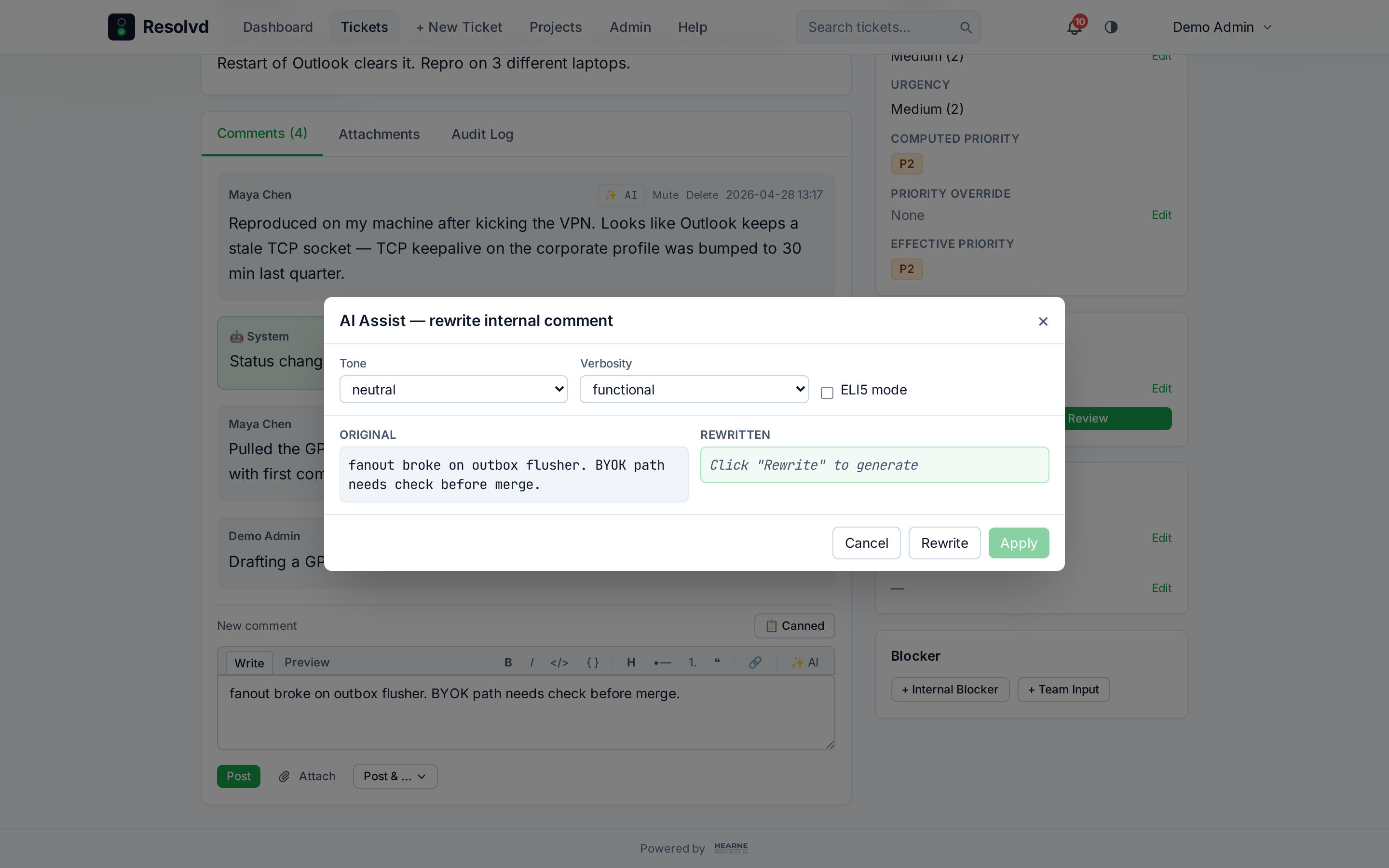
A ✨ AI button now sits inline on every composer that produces text humans read. Click it, pick a tone and verbosity, hit Rewrite, preview side-by-side with the original, Apply when happy. The model output never silently mutates your draft.
The keys-and-billing question lives with you. Resolvd ships the integration surface; you bring your own API credentials. Per-user encrypted key at rest, never returned from any GET — only a has_key boolean. Three adapters out of the box:
| Adapter | Notes |
|---|---|
openai | OpenAI Chat Completions. Compatible with Azure OpenAI, OpenRouter, vLLM, LM Studio. |
anthropic | Anthropic Messages API (Claude models). |
ollama | Self-hosted. No API key required by default. |
Each ships with a curated model list (cheap / balanced / heavy tiers) plus a Refresh from provider button that pulls the live model catalog using your saved key. New providers drop in by adding a file under backend/services/aiProviders/ — the rest of the pipeline doesn’t care.
Where the button appears: internal comment composer, vendor-bound comment composer (auto-flips when “Share with vendor” toggles), ticket title (single-line, terse-default), ticket description (rich), admin email templates (Subject + Body, with {tag.path} placeholders preserved verbatim), project description, canned response body.
Project context glossaries
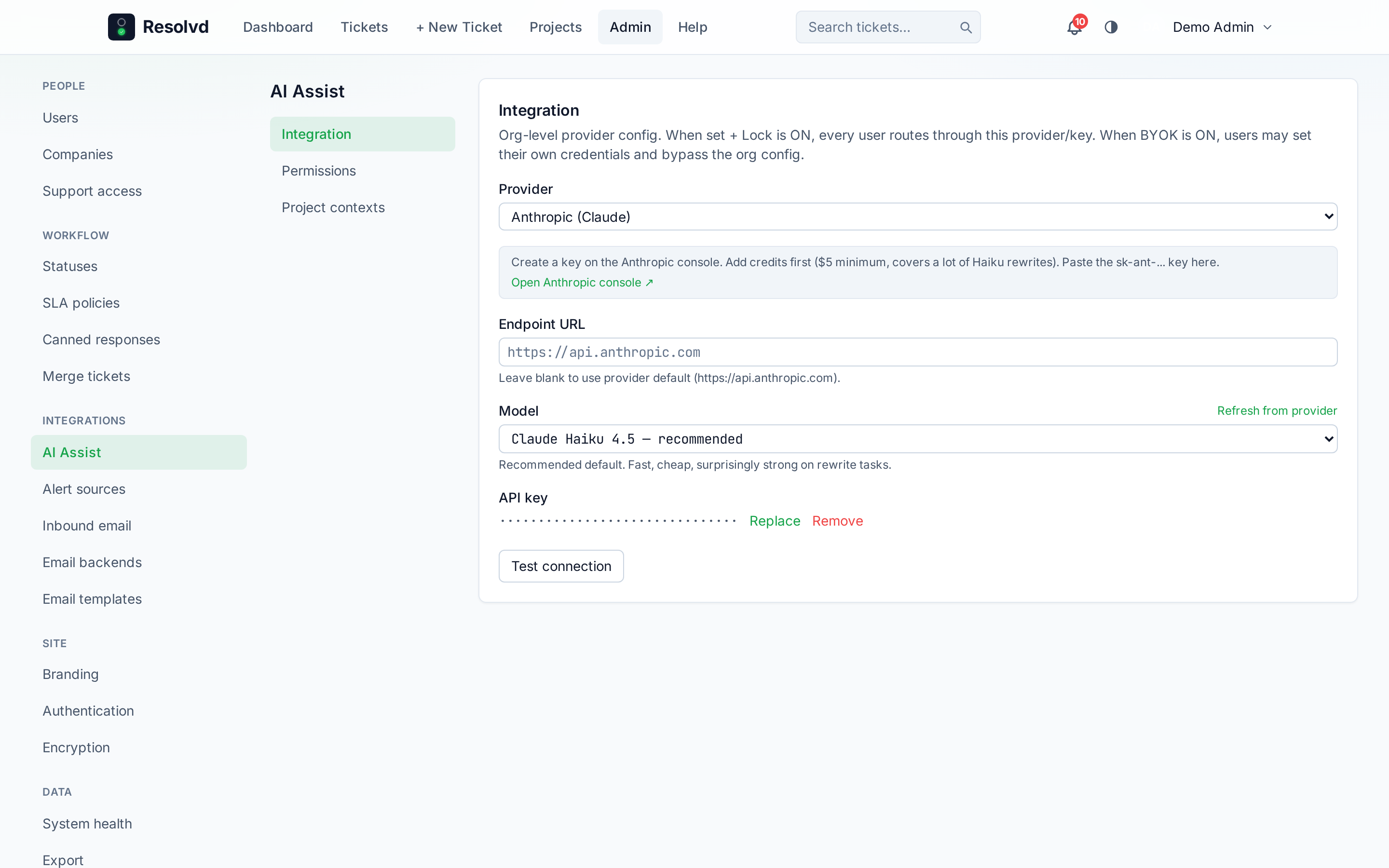
Admin → Integrations → AI Assist → Project contexts is a master-detail picker: pick a project, paste a markdown blob (8KB cap) explaining the sites, integrations, and lingo specific to that project. The blob gets prepended to every AI rewrite fired from a ticket in that project, so the model knows that “the bot” means your Slack notifier and “DC1” is a datacenter rack — and uses those names verbatim instead of inventing paraphrases.
Three layers of opt-in keep the cost story honest:
- Org admin — feature toggle on the AI Assist page (default ON)
- Project admin — per-project enabled flag (default ON, off keeps the blob saved but skips it)
- Per-user —
Include project context when rewritingtoggle in Account Preferences (default ON, off for users on a tight token budget)
All three must be ON for the context to ship with a call. The badge on each posted comment shows · project context applied when the blob fired.
Admin org-managed AI (the lock + BYOK story)
A new /admin/ai-assist page collapses every AI knob into one place with three sections — Integration, Permissions, Project contexts — laid out master-detail like the email backends page.
The org can configure its own provider + model + encrypted key, then decide what users can do with it:
- Lock users to org config — every rewrite uses the org credentials, no override possible
- Allow user BYOK (default on, only when not locked) — users can set personal credentials and bypass the org fallback
- AI usage disclosure — three tiers controlling who sees the ✨ AI badge on comments and tickets: author + Admin/Manager, Admin only, or every internal user (vendors never see)
A per-user “Publish my AI usage to teammates” toggle in Account Preferences lets a user opt their own posts up to org-wide visibility — useful when they’re paying for their own key and want the org to see usage so it can pick up the bill.
Usage disclosure badge
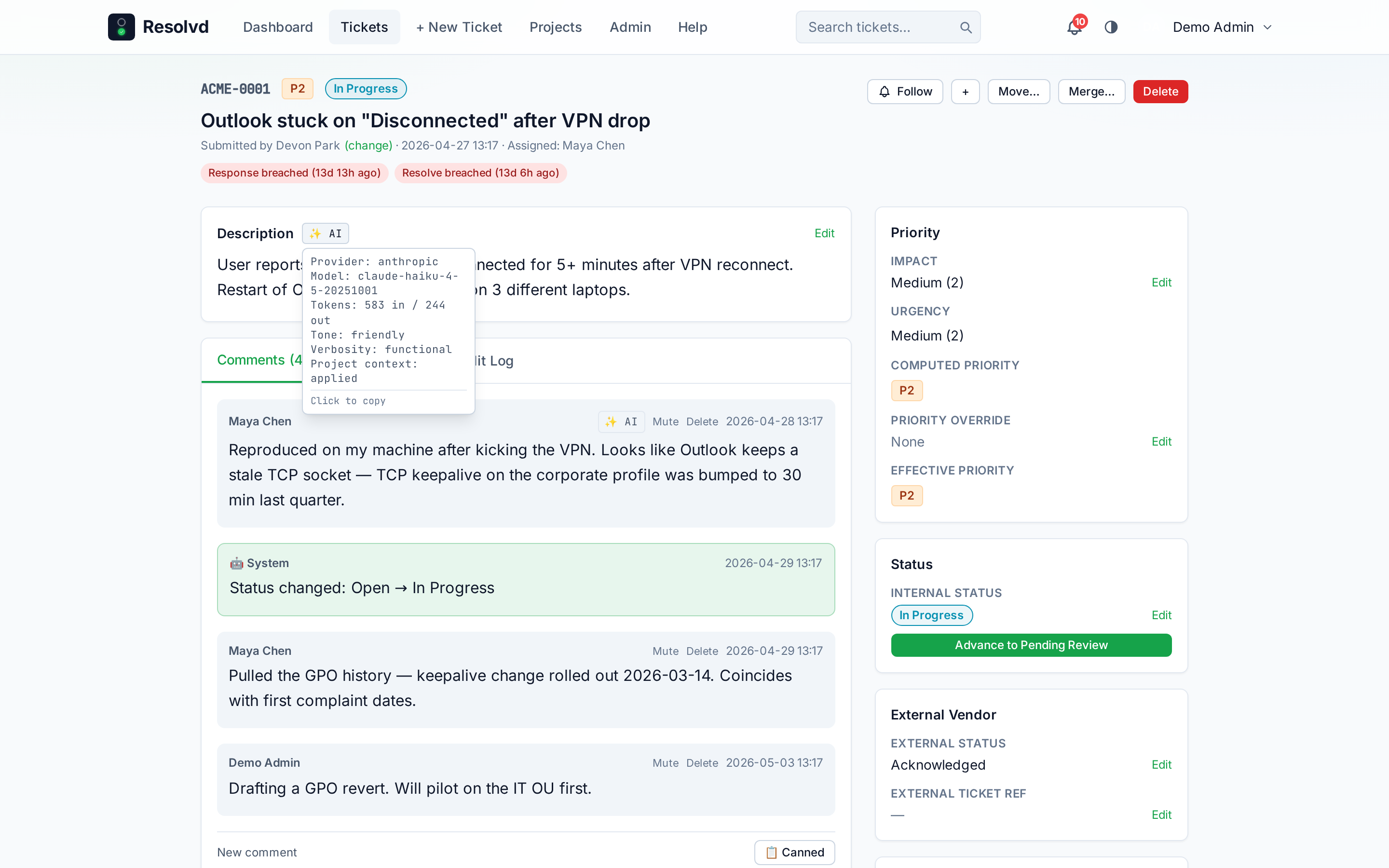
After a comment or ticket description is posted with an AI rewrite applied, a compact ✨ AI pill renders inline next to the timestamp / action buttons. Hover (or focus) opens a popover with the full readout: provider, model, tokens in / tokens out, tone, verbosity, ELI5 flag, and “project context applied” when relevant. Click the pill to copy the metadata block to your clipboard — useful when reporting AI output issues back to admin or support.
The pill wraps cleanly on mobile, never overflows the row.
Friendly provider errors
When the upstream provider rejects a call, Resolvd surfaces a kind-aware message instead of bubbling a 502: auth (key rejected), billing (out of credits), rate_limit, model_not_found, bad_request, server_error, network. Both the AI Assist test button and the rewrite modal render the friendly line plus an expandable “Provider details” disclosure carrying the raw upstream body for debugging.
How to use: Account → Preferences → AI Assist → pick a provider → follow the helper banner’s deep link to the provider’s console for a key → paste it → Test connection. Then click ✨ AI on any composer.
Notifications matrix
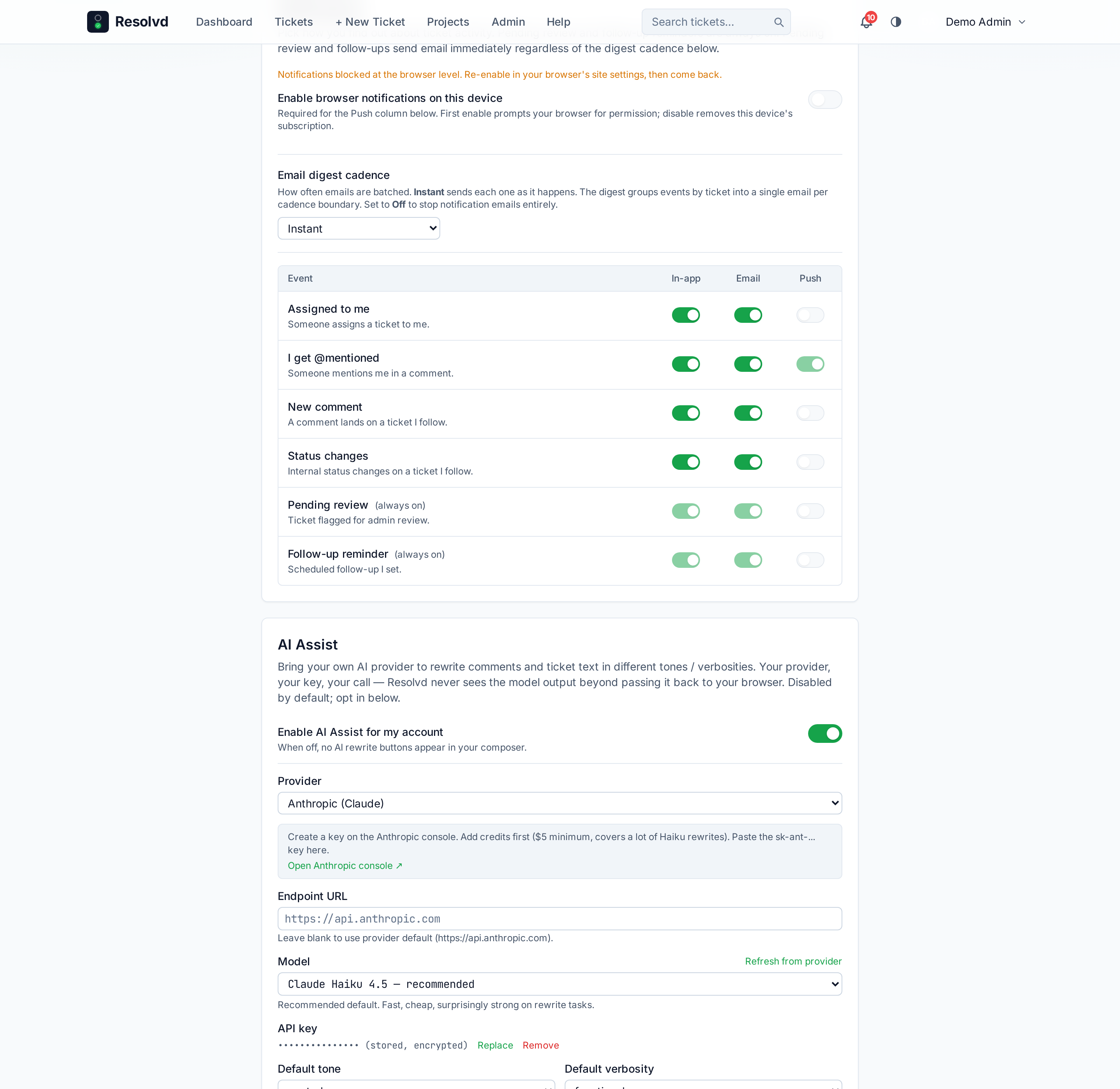
The flat email_on_* / push_on_* toggles in user prefs are replaced with a structured 6×3 grid in Account → Preferences → Notifications. Rows: assignment, mention, comment, status change, pending review, follow-up reminder. Columns: in-app, email, push. Each cell is independently toggleable.
pending_review and follow_up rows are server-side LOCKED_ON: in-app + email always fire and bypass the digest cadence — these are action-required events that shouldn’t be silently batched. The UI shows them greyed with “(always on)”.
Email digest cadence
A dropdown next to the matrix picks how email notifications get delivered:
| Mode | Behavior |
|---|---|
| Instant (default) | Each event sends immediately. |
| Hourly | Buffered in notification_outbox, flushed at the top of the next hour as one digest grouped by ticket. |
| 12h | Buffered, flushed at the next 00:00 / 12:00 in your local timezone. |
| Daily | Buffered, flushed at 09:00 user-local. |
| Off | Notification emails suppressed entirely; in-app + push still fire if those cells are on. |
A 5-minute scheduler tick drains the outbox; each user gets one email per cadence boundary, grouped by ticket, with all events bulleted inside. Empty buckets are skipped.
Vendor outbound emails stay on their own pipeline — the matrix only governs internal notifications.
SLA tracker
Two clocks now run on every ticket — response (closes when someone other than the submitter posts a non-system comment) and resolve (closes when resolved_at is set). Targets come from the new sla_policies table keyed on priority + project_id — an org-default row beats a project override beats the policy table’s default.
Default policies seeded on first boot:
| Priority | Response | Resolve |
|---|---|---|
| P1 | 30 min | 4 hrs |
| P2 | 1 hr | 8 hrs |
| P3 | 4 hrs | 24 hrs |
| P4 | 8 hrs | 72 hrs |
| P5 | 1 day | 7 days |
Tune them at Admin → SLA policies.
Pause-on-blocker
Both clocks pause when the ticket transitions into a status tagged awaiting_input or on_hold (vendor / customer wait time doesn’t count against you) and resume on transition out — due-at timestamps shift forward by the paused duration. First non-system non-submitter comment closes the response clock once.
Breach detection + dashboard card
A 5-minute scheduler flips the breached flag, stamps the breach timestamp (drives MTD reports), and fans out via the sla_breach notification event — in-app + immediate email regardless of digest cadence, because breaches are action-required.
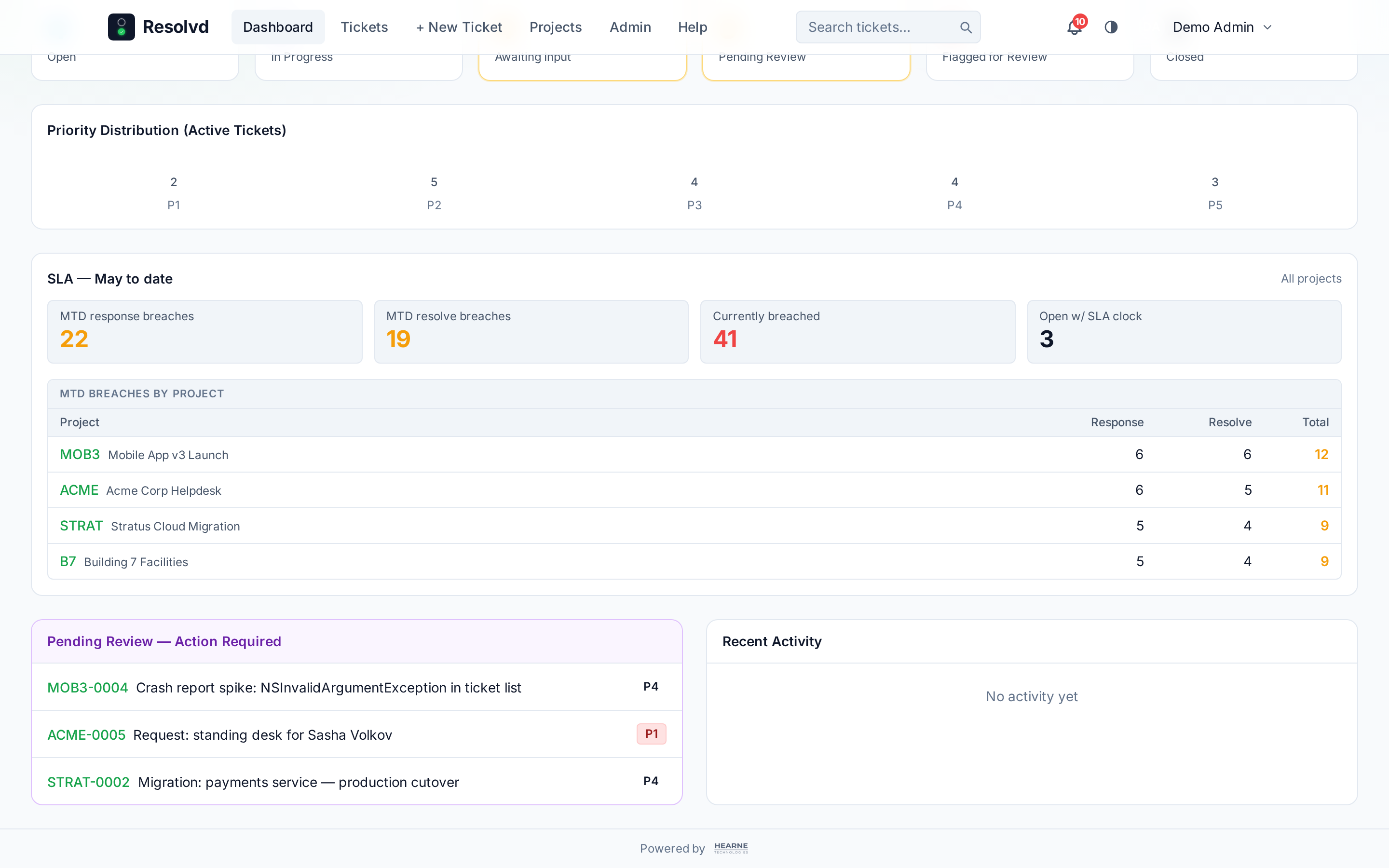
Dashboard gets a SLA — Month to date card with stat tiles (MTD response breaches, MTD resolve breaches, currently breached, open with SLA clock) plus a per-project breakdown table when MTD breaches exist. Admin / Manager see “All projects”; Submitter / Viewer see only the projects they’re members of.
Login hardening
Existing protections — argon2id, 8-failure per-user lockout, express-rate-limit — got layered with persistent storage and bot detection:
- Login attempt audit table — every successful + failed local login records email, IP, UA, reason. Indexed for fast lookback by IP and by email. Long retention.
- IP-based blocking — 20 failures from one IP in 24h refuses with 429 + Retry-After for 1 hour past the most recent failure. Catches credential stuffing that rotates across rate-limit windows.
- Honeypot field on the login form, invisible to humans and assistive tech. Filled = bot, refused with the same 429 a rate limit would return (no bot-distinguishable feedback). Logged so admins see the pattern.
- Form-dwell timer — sub-800ms submits get the same 429. Catches automated scripts that don’t simulate page-load delay.
- Session regeneration on every successful login transition — closes the session fixation gap.
- Response security headers — CSP, HSTS (when COOKIE_SECURE=true), X-Frame-Options DENY, Referrer-Policy, Permissions-Policy.
Admin gets a new endpoint pair under /api/security/login-attempts — raw log + per-IP / per-email aggregates. A dedicated Admin → Security page is coming in v0.6.1.
Smaller wins
- Mobile bell tray now centers via
fixed top-14 left-1/2 -translate-x-1/2on screens narrower thansm(was hugging the right edge); desktop layout unchanged. - AI badge auto-flip — the comment composer’s ✨ AI surface automatically becomes
comment_vendorwhen “Share with vendor” toggles on, so prompts can specialize the tone for external recipients.
Schema
Migration is additive and idempotent. Existing installs upgrade clean — no data loss.
notification_outbox(id, user_id, event_type, ticket_id, payload jsonb, created_at, scheduled_flush_at, sent_at)notification_prefsJSONB sub-blob underusers.preferences— backfilled with sensible defaults; the five legacyemail_on_*/push_on_*keys are stripped in one sweepsla_policies(id, priority, project_id nullable, response_target_minutes, resolve_target_minutes)- 9 new SLA-related columns on
tickets(due-ats, breach flags + timestamps, paused state) ai_settingssingleton (org provider/endpoint/model/encrypted key + lock + BYOK + audience)ai_rewrite_logs(id, user_id, provider, model, surface, project_id, tokens, tone, verbosity, eli5, applied_to, config_source, project_context_used)- 8 new ai_* columns on
commentsandtickets(snapshot metadata + publish consent) projects.ai_context_md+ai_context_enabled(admin glossary)users.ai_api_key_enc BYTEA(personal key, encrypted via standard envelope wrapper)branding.ai_assist_enabled+ai_project_context_enabled+ai_disclosure_audience(legacy fields, now back-compat read fallback forai_settings)login_attempts(id, email, ip, ua, success, reason, honeypot_filled, form_dwell_ms, attempted_at) — indexed by ip+time, email+time, failures-only
Get the release
docker compose pull && docker compose up -d against the published images. The schema migration runs on backend boot. Existing user notification prefs migrate forward automatically; AI features stay off until an org admin configures a provider or a user pastes their own key.